







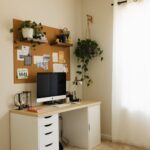



Creating a home workspace that is both cozy and productive can transform the way you work from home. A well-designed space helps you stay focused, reduces stress, and inspires creativity. Whether you have a dedicated room or a small corner in your living area, applying the right tips can make a significant difference. Here’s how to create a home workspace that combines comfort with efficiency.
Choose the Right Location
Assess Your Space
Start by choosing a spot with minimal distractions. Natural light is ideal, so consider placing your desk near a window. If noise is a concern, a quieter area of your home can help maintain concentration.
Consider Privacy and Accessibility
Your workspace should provide a degree of privacy, especially if you live with others. At the same time, it should be easy to access for your daily routine without feeling like a burden to set up or pack away.
Invest in Comfortable Furniture
Ergonomic Chair and Desk
Comfort is key to maintaining productivity. Invest in an ergonomic chair that supports your back and a desk at the right height to avoid strain. Adjustable furniture options can also accommodate various tasks and postures throughout the day.
Space for Essentials
Ensure your workspace has enough surface area to hold your computer, notebooks, and other tools without feeling cluttered. Organized spaces encourage a clear mind.
Optimize Lighting
Use Natural Light
Natural light enhances mood and energy levels. Position your desk to benefit from daylight, but avoid glare on your screen by angling your monitor appropriately.
Add Layered Lighting
Supplement natural light with good task lighting such as a desk lamp. Consider ambient lighting to create a warm and inviting atmosphere, reducing eye strain when working late hours.
Organize Thoughtfully
Declutter Regularly
A tidy workspace promotes focus. Keep only necessary items on your desk and use storage solutions like shelves, drawers, or boxes for everything else.
Use Organizers and Labels
Desk organizers, file holders, and label systems can help maintain order and make it easier to find what you need quickly, saving time and reducing frustration.
Personalize Your Space
Add Comfortable Textiles
Consider a small rug, cushions, or a cozy throw to soften the area and make it feel welcoming.
Include Plants and Artwork
Plants improve air quality and add a touch of nature, which can elevate your mood. Artwork or personal photos can inspire creativity and make the space uniquely yours.
Manage Technology
Set Up Efficiently
Arrange cables neatly with clips or zip ties to avoid tangling. Position your monitor at eye level and keep essential gadgets within reach.
Minimize Distractions
Limit non-work-related notifications on your devices. Use apps or settings that help you stay focused during work hours.
Develop a Routine
Consistent Work Hours
Establishing set work hours encourages productivity and helps maintain work-life balance.
Take Breaks
Schedule short breaks to rest your eyes, stretch, and recharge. A comfortable workspace supports healthy habits that reduce fatigue.
Maintain Air Quality and Comfort
Ventilation
Fresh air improves concentration and comfort. Open windows if possible or use an air purifier.
Temperature Control
Keep your workspace at a comfortable temperature. Use fans, heaters, or cozy blankets as needed to maintain comfort throughout the year.
Final Thoughts
By thoughtfully designing your home workspace, you create an environment that supports both productivity and comfort. Remember that your needs might change over time, so remain flexible and adjust your setup as necessary. Small improvements can have a big impact on your work-from-home experience.
Creating a cozy and productive workspace is within reach—start with these simple tips and enjoy a better working day from the comfort of your home.